
• Skip to primary navigation
  • Skip to main content
pragati logo

Pragati Tech Services

  • Home
  • About
  • Services
    • Business Central
    • Back Office Support
    • Ecommerce Solutions
    • Customer Support
  • Blog
  • Contact
  • Show Search
Hide Search
You are here: Home / Archives for 2013

Archives for 2013

2 UX Tips to Bubbly

Sachin · September 26, 2013 ·

Bubbly is a voice based social network so instead of typing on your phone, you can record your voice and post it to share with rest of the world. Interestingly celebrities like Amitabh Bacchan, Priyanka Chopra, Salman Khan etc are using it so fans now have a great option to connect with them on a more personal level. You can also apply filters and effects to your voice before posting which is really cool. They already have more than 30 million users. Tech Crunch has a good article on them saying how they started as Twitter for Voice and later morphed into Instagram of Voice.

I was just playing with Bubbly iOS App and it occurred to me that they can make 2 simple changes to make user-experience even better so I am sharing my thoughts here:

1. Continuous Playback when navigating app

Now my biggest issue with the app is that voice playback stops if I navigate away to a different screen. Sometime I tap on a user and navigate to his feed while listening to voice post of another user. When I do that playback just stops suddenly. Even an accidental tap which takes you a different screen will stop playback. Now this is not a very pleasant experience and I think playback should continue until I stop it or it is done playing or I start listening to another post.

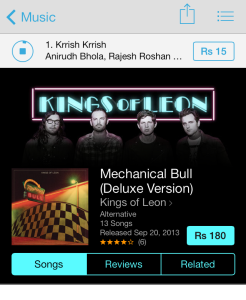
iTunes store app already has a good solution for it. As you can see in the image below, I am listening to a song while browsing another album. Current song is simply moved to top bar and rest of the screen shows the screen I navigated to. Something along these lines will be very helpful in Bubbly app as well.
2. Pause option (May be even reverse/forward)

I would really love to jump to a certain playback position sometimes or may be go back a few seconds/minutes in playback at times. Also this will be really helpful in absence of continuous playback as suggested above. So even if I navigate away to a new screen, I can atleast comeback and don’t need to listen to same post from the beginning and can just jump to the section I haven’t listened already. May be I can just swipe along the playback circle to control this?
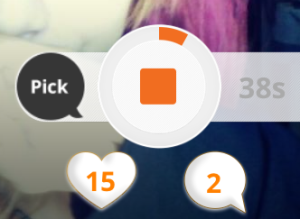
Also maybe the current stop button can be converted into a pause button instead? And may be even multiple posts can remain paused and I can choose to resume playing whichever I want, whenever I want?

So these were my 2 cents aka 2 tips 🙂

However I would also like to point out that I really like the UI of the app, their pull-down-to-refresh animation is really cool and these are just 2 things which I would like to see improved, other than that I find their UI very innovative and usable.

I would like to leave you by sharing an interesting fact about Bubbly which is, it is headquartered in Singapore and CEO Thomas Clayton recently shared how he created a Silicon Valley caliber team in Asia and I think he was quite successful in doing that and their CTO Justin Mann is one proof of that.
Wanted Hackers

Sachin · September 21, 2013 ·

Wanted hackers!! from Sachin Palewar

I gave a talk to MCA (Master of Computer Applications) students of GHRCE yesterday. Topic of my talk was ‘Wanted Hackers’ and objective was to inspire students to adopt hacker culture so that they can become better programmers and do great things in future.

At the outset I emphasised that Hacking is not actually what media and general public thinks it is and there is difference between hacking and cracking. Hacking is good, cracking is not. I showed a video of TED talk by Thomas Suarez: A 12-year-old app developer to inspire students.

Then I elaborated on various websites which organise programming contests and challenges. I also shared my views on which programming languages students should learn and from where.

I ended my talk with a brilliant video from code.org starring Bill Gates, Mark Zuckerberg, will.i.am, Chris Bosh, Jack Dorsey, Tony Hsieh, Drew Houston etc.

I hope my talk inspired atleast a few students to become good programmers and not average unemployable college passouts which are so common in India.

2 Shopping Tips for LinkedIn

Sachin · June 2, 2013 ·

I wrote a blog post some days back praising LinkedIn iPhone App’s use of smartphone capabilities, however there is one thing clearly missing in the App and that is, support for location sharing. I see immense use of using location in the App.

What if you can automatically come to know about one of your LinkedIn connections visit to your city or what if you are in some conference and you can see and connect with other LinkedIn users from the app itself? Sounds interesting right? I am not sure if its a conscious decision by LinkedIn to not use location in their app, but I don’t see any reason why they shouldn’t support it. Obviously there may be some privacy and security concerns but users can be allowed to opt-out if they want to. As long as users can control their location sharing, there should not be any issue.

Thankfully if you want to use location with your LinkedIn account there is an App for that and the App is called Here on Biz and is available for free on AppStore. So my first tip for LinkedIn is that it should buy ‘Here on Biz’ and integrate all its features in the official LinkedIn App. Here on Biz on its own may not get as much traction, not everybody will install it or know about it, but if these facilities are available in the official app, everybody will be able to use it. ‘Here on Biz’ has just launched another great feature in their app and it’s called ‘Influencer of the Month’ where they highlight one high-profile business leader each month and users of the app can get a coffee date with that person. Read more about it here.

One specific need most of the founders have is need to find a suitable Co-Founder. What if they can search for a co-founder on LinkedIn? I know one can always browse through their connections to find a suitable co-founder or maybe even use LinkedIn’s Job section for it. But we all know finding a co-founder is not as straightforward as hiring somebody so Jobs section is not really much useful. There is clearly a need to fill this void and one company is making an attempt to do just that, the company is called Founder2Be and as par their own admission “Founder2be is like Match.com meets LinkedIn for entrepreneurs”. So my second tip for LinkedIn is that it should buy Founder2Be and make searching for a co-founder available as an independent section on their website.

It’s entirely LinkedIn’s decision to buy these companies or not, all I am saying is that I would love to have these 2 features in LinkedIn. Also I respect both ‘Here on Biz’ and ‘Founder2Be’ for their innovative offerings and wish them both all the luck in future. It’s not my intention to offend them by suggesting them as potential acquisition targets to LinkedIn.

Thanks for reading.

What can an App Developer learn from LinkedIn iOS App?

Sachin · April 20, 2013 ·

LinkedIn’s iPhone App is great, but I will come straight to the feature which impressed me most and that is it’s integration with native Calendar app on iPhone. When you access the menu by tapping the icon on Top-Left (Pretty common UI element these days), you see an option to view Calendar and you can see your calendar events right inside the LinkedIn App, but what makes it really interesting is you can see Photos of all the attendees of an meetings and when you select an attendee, you are taken to his LinkedIn profile. I like this feature so much that instead of opening native Calendar app on my iPhone, I just open LinkedIn and check my calendar there.

Ok so what as an App Developer we can learn from this? We learn that while creating an iPhone app we should think how we can use smart-phone features like location, calendar, contacts, camera, sensors etc. in such little but innovative ways to add value to our app. What LinkedIn has done is that it has offered its users a new facility which is not even available on its website. Mobile app should not necessarily always have lesser features than a website, sometime it can have some extra features as well like in the case of LinkedIn app, so always think how can you use various features of an smart-phone.

Of Course there are many other things you can learn from LinkedIn app. They have slide-from-left menu screen and then slide-from-right for setting up some preferences, then we have pull-down-to-refresh gesture, all these have become pretty standard in any good app these days. App is fast and fluid and whole UI is generally very nice.

Basically what we need to ultimately remember is not see a mobile app as just a smaller screen version of website or desktop software, so we should not just try to fit everything for small screen of phones. We need to realise that mobiles are used differently than computers and mostly at different times and situations so we should strive to give our users optimum user-experience to suit all this.

Kiran Prasad who heads the mobile development team at LinkedIn puts this very beautifully:

We’re looking at the ‘entrenched’ use case [for desktop users], the coffee-and-couch use case [for tablet users], the two-minute use case [for mobile phone users].

You can read the complete article on VentureBeat.com for more of his insight.

Hope you found my little analysis of LinkedIn app useful and use some of it when you create that next great app of yours. I am also a big fan of LinkedIn as a Software Development Company (Not just their App Development) and you can read about their ‘Continuous Deployment’ model to know why.

Thanks for reading 🙂

Pragati Tech Services

Copyright © 2026